Facebook Group Post Failed: Error Codes and Recovery
- Group posting
- Account safety

A Facebook group post can fail because of permissions, account restrictions, a session problem, a changed request or an outcome that could not be confirmed. A numeric code helps investigate it, but a generic server error does not prove that an admin refused your post. If several groups fail in the same way, including a group you administer, stop and check the session and publishing path before treating every group as restricted.
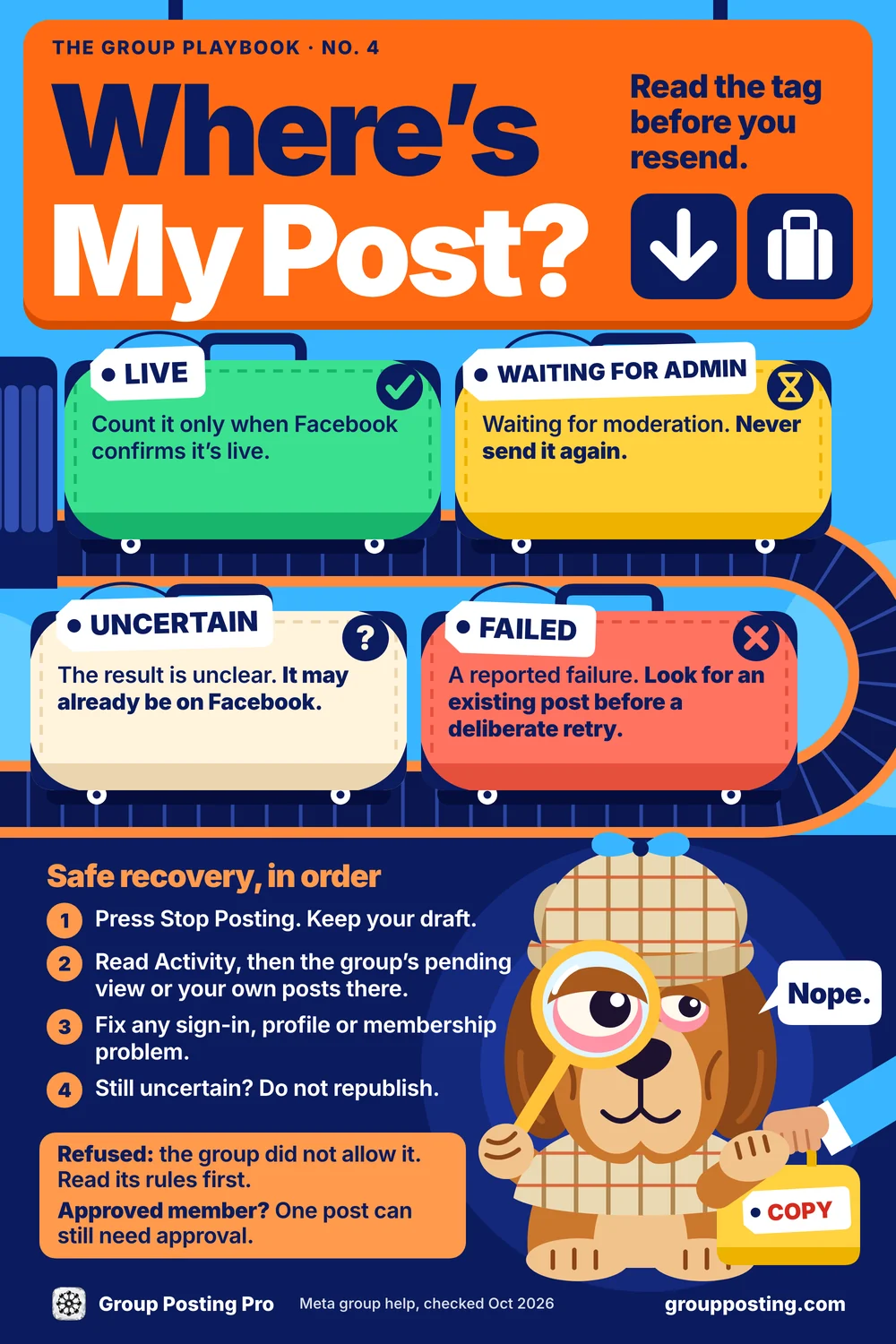
Read this sheet as text
Read the tag before you resend.
- Live. Count it only when Facebook confirms it’s live.
- Waiting for admin. Waiting for moderation. Never send it again.
- Uncertain. The result is unclear. It may already be on Facebook.
- Failed. A reported failure. Look for an existing post before a deliberate retry.
Safe recovery, in order
- Press Stop Posting. Keep your draft.
- Read Activity, then the group’s pending view or your own posts there.
- Fix any sign-in, profile or membership problem.
- Still uncertain? Do not republish.
Refused: the group did not allow it. Read its rules first.
Approved member? One post can still need approval.
Meta group help, checked Oct 2026
Start with these checks
- Press Stop when the same unexplained failure repeats across groups.
- Inspect Activity and Facebook. A published, held or uncertain post must not be sent again just because the result was unclear.
- Confirm the identity. Check the profile or Page selected in Facebook and the extension.
- Check the session and Account Status. Resolve Facebook login, verification and restriction notices manually.
- Keep the diagnostic. The code, extension version and Activity outcome help support investigate without your password, cookies or private post content.
The Facebook group posting error code decoder
These are diagnostic codes reviewed against Group Posting’s extension source on October 3, 2026. Public Graph API codes and seven-digit Facebook web errors are different surfaces. Several rows describe our classifier’s interpretation, not an official Meta diagnosis. Installed versions may differ. A code alone cannot prove the exact cause, publication or account health.
The reviewed classifier has a separate short-code map: 102, 190 and 368 are considered only in dedicated code fields, not every field containing the same number. This matters because a subcode or dispatcher number can belong to a different namespace. Keep the field and context with the number. Meta’s public error-handling reference addresses the public API; it did not load during this review and is not used as evidence for the undocumented seven-digit definitions.
| Code | Diagnostic interpretation | Scope | What to do |
|---|---|---|---|
3809006 | Generic field/server exception; cause unverified | Unclassified | Press Stop. Inspect Activity and the group, then check the session. Do not republish an uncertain result. |
1404078 | Our classifier treats this as blocked; exact cause unverified | Precautionary stop | Stop. Check Account Status, the on-screen message and the session; do not repeat publication attempts. |
1390008 | Our classifier treats this as an action block | Account restriction suspected | Stop. Check Facebook Account Status and follow the restriction notice. |
368 | Blocked-action interpretation in our classifier | Blocked action | Stop. Follow Facebook’s account-status guidance; do not use another identity during a restriction. |
1373034 | Permission error in our classifier | Permission/context | Inspect the group, membership, selected profile or Page, Activity and request context. |
1675030 | Permission error in our classifier | Permission/context | Inspect the group settings and intended identity. Do not assume the account is healthy from this code. |
190 | Authentication/token diagnostic | Session | Open Facebook, resolve login requests, then check previous Activity before resuming. |
102 | Authentication/token diagnostic | Session | Check the current Facebook session and intended profile or Page. |
1348131 | Token-expiry interpretation in our classifier | Session suspected | Open Facebook manually and refresh the session; inspect uncertain previous results. |
1404006 | Invalid-session interpretation in our classifier | Session suspected | Resolve the Facebook session before resuming. |
1357001 | Authorization interpretation in our classifier | Session/context | Check the session and which identity is acting. |
1357004 | Checkpoint interpretation in our classifier | Verification | Stop and complete Facebook’s verification manually. |
1357032 | Request/actor mismatch interpretation in our classifier | Identity/request | Stop and confirm the selected profile or Page; refresh the session before a later deliberate attempt. |
1357006 / 1357007 | Actor-mismatch interpretations in our classifier | Identity/request | Confirm the intended identity and inspect Activity; no silent profile substitution. |
2207001 | Request-identifier interpretation in our classifier | Tooling suspected | Keep the code and extension version, check the status page and wait for an appropriate update. |
4 / 17 | Public-API numeric diagnostics; meaning not verified for browser group posting here | Check the surface and field | Keep the report and context. Do not infer a browser posting quota or fixed waiting period from the number. |
3809006: generic field_exception or server error
The message can read “An server error field_exception occured. Check server logs for details.” Code 3809006 does not identify a particular group rule. It is a generic field/server exception with an unverified cause. A failed request or changed Facebook behavior needs investigation alongside the session, identity and payload. Even the same failure in your own group does not establish that every group rejected your post.
Earlier Group Posting clients labelled this code group_refused. The repaired classifier preserves fb_3809006 as an unclassified diagnostic, rather than adding a generic error as proof of a group restriction. That classification correction does not guarantee that Facebook will accept the next request. Check your installed extension version and the status page if the error persists.
Safe next step: press Stop, inspect Activity and the actual group for a published or pending post, then check the Facebook session and the selected profile or Page. Do not automatically republish an uncertain result. If a post definitely failed and the cause is resolved, any later attempt should be deliberate and paced.
1404078: precautionary restriction handling
Our current classifier routes 1404078 through its blocked handling as a precaution. This page does not establish an official Meta definition or a captured cause for that seven-digit web error. Treat it as an unverified diagnostic and inspect the restriction message Facebook actually shows.
Stop posting and check Account Status, the browser session and the intended identity. Follow any Facebook restriction notice; do not repeatedly test publication or switch identities during a restriction. A fixed waiting period or successful next post cannot be promised from the number alone.
Account restrictions, permissions and uncertain requests
An account restriction can affect activity across groups. A particular group may separately limit its members, post types or Page participation. Session and request failures are additional possibilities, and a generic exception does not place the result cleanly into one of the first two categories.
If Facebook shows a restriction, stop and follow its guidance. If the issue is clearly a group permission, check that group and its rules. If the cause remains uncertain, keep it uncertain: do not assume the account is healthy or that an admin rejected the content.
1373034 and 1675030: permission or request context
The reviewed product classifier maps these numbers to permission. That is an operating category, not proof of which particular setting caused the response. Check membership, participation permission, intended profile or Page, allowed formats and the attempted content. Do not conclude that the whole account is healthy because one response was categorized as a permission issue.
Meta’s joining guidance, checked October 3, 2026 through official Help content, says admins may disallow Pages. It supports that permission possibility, not a definition of either numeric code. Resolve the actual setting before another attempt.
1390008 and 368: stop for the blocked-action category
The product source maps 1390008 to blocked; 368 maps to that category only in the short-code fields described above. Stop and read the actual notice Facebook shows. Do not switch groups, tools or identities to keep performing a restricted action. Neither number establishes a universal duration or a remedy that works for every account.
The Page and profile check
Confirm the identity you intend to use in both Facebook and the extension. Check whether the Page or profile can post manually in the group and whether the group permits Page participation. A failed Page attempt should not silently turn into a personal-profile post. Resolve membership or permission questions before another attempt, and inspect Activity for any previous publication or moderation hold.
Session, authentication and request changes
Authentication codes call for a manual session check: open Facebook, complete login or checkpoint prompts, and confirm the intended identity. An authentication failure is not evidence that another restriction is absent. Request or interface changes may require a tool update; retain the code and version and check the status page rather than repeatedly sending the same content.
190, 102, 1348131, 1404006 and 1357001: session checks
The source classifier places these in authentication handling, with the short-code qualification for 190 and 102. Open Facebook manually, resolve login prompts and confirm the identity you intend to use. The category describes where to investigate; it does not certify that renewing a session resolves all other permissions or account restrictions.
1357004: verification needs a manual step
The product maps 1357004 to authentication handling with a checkpoint interpretation. Keep posting stopped and complete the verification Facebook actually requests in Facebook itself. Never send a troubleshooting contact your password, cookies, session tokens or an unredacted browser-network export.
1357032, 1357006 and 1357007: acting identity and request mismatch
The reviewed implementation groups these as actor_mismatch. Confirm the profile or Page selected in Facebook and the extension. An internal recovery routine is not permission for you to repeatedly resubmit content, and a failed Page attempt should not become a personal-profile post without a deliberate decision. Check previous outcomes first and retain the code and version if the problem persists.
2207001: possible request-identifier change
The classifier groups 2207001 under its request-identifier category. That points support toward the publishing request and tool version; it does not prove that every group refused your content. Check the status page and installed version, keep the diagnostic and avoid repeatedly sending the same request. A code without its response context cannot establish a platform-wide incident.
My post vanished: live, waiting for admin, uncertain or failed?
Live requires a publication confirmation. Waiting for admin means the post is waiting for moderation; it is not a confirmed publication and should not be sent again. Uncertain means the available result did not establish what happened. It may still have reached Facebook. Failed is a reported failure, but check for an existing post before a deliberate retry.
Use the group’s pending or Your posts view and inspect Activity. Meta’s participation guidance, checked October 3, 2026, explains that an individual post can still require approval after someone is approved to participate. Moderation, spam filtering, media processing or removal can affect visibility. The extension cannot bypass Facebook spam checks, guarantee admin approval or make every supported post land.
Safe recovery without duplicates
- Press Stop and keep the remaining draft or queued work.
- Read Activity and check Facebook for the existing post or moderation hold.
- Resolve any session, identity, membership or restriction issue manually.
- If the result is still uncertain, do not republish. Keep the diagnostic for support.
- If failure is established and the cause is resolved, use a deliberate, paced next attempt. Stop again if the unexplained error repeats.
Group Posting offers Direct API through Facebook’s internal web GraphQL requests and Classic DOM through the visible composer. Both use the existing browser login and are distinct from the retired public Facebook Groups API. Keep the computer awake and online, Chrome open, the extension enabled and Facebook signed in for scheduled work. Facebook decides acceptance, moderation and availability. No tool can promise zero risk.
What to include in a support report
Report the extension version, posting mode, intended identity type, diagnostic code and field if available, time and time zone, affected scope and Activity outcome. Say whether you found a published post, a moderation hold or no confirmed result. Describe the visible Facebook notice accurately instead of inventing a diagnosis.
| Include | Keep out |
|---|---|
| Extension and browser version; Direct API or Classic DOM | Passwords, cookies, session tokens and login links |
| Code, its field and a redacted visible message | Raw network headers, full response dumps and private customer content |
| One group or several; profile or Page | Unnecessary member names or personal identifiers |
| Confirmed, held, uncertain or failed result; actions already taken | A claim that the number alone proves an admin decision |
Use the help route for the appropriate support contact. You do not need to reveal a credential to explain that a session check is required.
Frequently asked questions
Why did my Facebook group post fail?
A failed post can reflect a group permission, an account restriction, an expired session, a request error or a result the tool could not confirm. The code is a diagnostic clue, not proof that every group rejected the post. Stop a run that fails across several groups, inspect Activity and Facebook, and check the selected profile or Page before deciding what to do next.
What does Facebook error 3809006 mean?
Code 3809006 can accompany a generic field_exception or server error. Its cause is unverified: it does not by itself prove that an admin refused the post or that your account is restricted. Press Stop, inspect Activity and the group for a published or pending post, and check your Facebook session and selected profile or Page. Do not automatically republish an uncertain result. If failures continue, keep the code and extension version for support.
What does Facebook error 1404078 mean?
Group Posting currently treats 1404078 as blocked as a precaution in its error classifier. This is our interpretation, not a confirmed official Meta definition for this seven-digit web error; the exact cause remains unverified here. Stop posting and check Facebook Account Status, the on-screen restriction message and your session. Do not repeatedly publish or switch identities during a restriction.
What does Facebook error 1373034 mean?
Our classifier treats 1373034 as a permission error. Check membership, the group rules, whether Pages are allowed, your selected identity and the content you tried to send. A permission response can also need request-level investigation; it cannot establish that the whole account is healthy. Inspect the actual group and Activity before retrying or moving on.
What does Facebook error 1390008 mean?
Our classifier treats 1390008 as an account-level action block. Stop posting and read the restriction shown in Facebook Account Status. Do not keep trying across groups or switch tools to continue during a restriction. Facebook controls when the feature becomes available again; there is no fixed recovery time we can promise.
What is Facebook error code 368?
Group Posting treats code 368 as a blocked action in its current classifier. Stop posting, read the explanation Facebook provides and follow its account-status guidance. A numeric code is a diagnostic clue rather than proof of the exact cause, and the public Graph API and browser web errors are different surfaces. Inspect the context as well as the number.
What does "Insufficient permission" mean on a Facebook group post?
The request did not have the permission needed in its current context. Possible causes include membership, group posting settings, an identity that is not allowed to post, or a request problem. The text alone does not verify admin approval, publication, or account health. Check Facebook and Activity before making another attempt.
Why can't I post in a Facebook group as my Page?
A group may allow profiles but not Pages, or the Page may not have the required membership or posting permission. Confirm the Page selected in Facebook and in the posting tool, then check the group’s actual settings. If a profile is appropriate, switch deliberately for a later attempt; do not let a failed Page post silently publish from a personal profile.
How long does a Facebook posting block last?
Facebook decides the duration and may show it in Account Status or the restriction notice. We cannot guarantee a recovery time from a numeric code. Stop during a restriction and follow Facebook’s instructions rather than repeatedly testing the blocked action.
Is Facebook jail the same as a group refusing my post?
An account restriction and a particular group’s posting rules are different possibilities. A generic error does not establish either one. Check Account Status for restrictions and inspect the group’s permissions and moderation queue. Keep an unverified cause labelled as uncertain rather than assuming the account is healthy or every group rejected the content.
Should I retry a failed Facebook group post?
Only consider a deliberate retry after checking Activity and Facebook and establishing that the post was neither published nor held for approval. An uncertain result may already have reached the group. Do not automatically republish it, and do not repeat attempts while an account restriction, session problem or unexplained failure remains. Keep the draft and resolve the cause first.
My post is not showing in the Facebook group — was it blocked?
It may be waiting for admin approval, hidden by moderation, removed, still processing media, or not confirmed by the tool. Check the group’s pending or Your posts view and Activity. Waiting for admin and Uncertain are distinct from Live and Failed; do not republish merely because a post is not yet visible.
What do Facebook errors 190 and 102 mean?
Group Posting treats 190 and 102 as authentication or access-token diagnostics. Open Facebook manually, complete any login or verification request, and confirm the profile or Page you intend to use. Inspect any uncertain previous result before resuming; refreshing a session does not guarantee that another posting restriction is absent.
What is a Facebook checkpoint error?
Group Posting treats 1357004 as an authentication checkpoint. Open Facebook and complete its verification manually. Keep automation stopped until the session and intended identity are ready, then inspect the previous results before resuming. Never provide your password or session cookies to a troubleshooting contact.
Why does my posting tool suddenly fail for everyone at once?
A broad failure can reflect a Facebook request or interface change, a service incident, session problems or an error the tool has classified incorrectly. Code 2207001 is routed as a request-identifier problem in our classifier. Check the tool’s status and version, retain the code and avoid repeated publication attempts; a widespread pattern is not proof that all groups independently refused the content.
Should I keep the error code or the message?
Keep both, with sensitive details removed. The reviewed classifier uses numeric codes and code fields to group reports alongside message context. A generic code still cannot determine an exact cause. The selected identity, Activity outcome and the notice shown directly in Facebook help distinguish permissions, restrictions, authentication and request problems.
Sources and limits of the decoder
The decoder was reviewed against Group Posting’s extension classifier on October 3, 2026. Its internal web-error categories describe product handling; installed versions may differ. The seven-digit definitions are not attributed to Meta. The public Graph API reference could not be retrieved in this review, and Meta Help sometimes returned login shells. Retrieved official Help content supports the participation and Page-permission possibilities linked above, not the undocumented numeric definitions. Generic errors and causes without a captured or published definition remain unverified. No signed-in Facebook recovery test was performed for this article.
Keep going
Explore the complete guide: How to post to multiple Facebook groups.
For the group-publishing part of your workflow, explore posting controls and account safety, or compare plans on Group Posting pricing.