Facebook Marketplace vs Facebook Groups for Selling: Fees and Rules
- Facebook groups
- Selling
- Marketplace

Use Facebook Marketplace for one-off physical items you want local buyers to find by searching, and Facebook groups when you sell to a niche audience that already trusts the group. Marketplace charges a selling fee of 10% (minimum $0.80) on U.S. orders paid through Meta’s checkout. Meta describes no selling fee for posting an item in a buy and sell group. Most sellers get the best result by using both and keeping each listing up to date.
This guide compares the two on fees, reach, rules and effort, using Meta’s own Checkout Terms, Commerce Policies and Help Center pages. Sources were checked on 28 October 2026 and fees change, so confirm them in your account before you price an item.
1. Side by side
| Marketplace | Buy and sell group | Niche group (regular post) | |
|---|---|---|---|
| Best for | Local, one-off physical items | Items for a local or hobby community | Handmade, collectibles and shop updates for people who share an interest |
| Fee from Meta | 10% (minimum $0.80) on U.S. orders paid through Meta’s checkout | None described on Meta’s group-selling help page | None, but the group’s rules decide whether you may sell |
| How buyers find you | Search and browse listings | The group’s feed and Buy and Sell tab | The group’s feed |
| Who sets the rules | Meta’s Commerce Policies | Meta’s Commerce Policies plus the admins | The admins, plus Meta’s Community Standards |
| Setup | Create a listing | The admin must have added the buy and sell feature | None |
The fee, the setup and the rules are the three differences that matter. The next sections take them in turn.
2. Fees, with the maths
Meta’s Checkout Terms list the U.S. selling fee for Marketplace as 10%, with a minimum of $0.80. The fee is “calculated based on the entire amount of the Transaction”, which includes the sale price, any shipping fee and applicable taxes (Meta Checkout Terms). It applies to sales paid through Meta’s checkout, which in practice means shipped orders. A 2024 report says in-person sales on Marketplace carry no selling fee (Value Added Resource); check your own Seller Hub.
For comparison, eBay’s standard fee for most categories is 13.6% of the total up to $7,500 plus a per-order fee of $0.30 (orders of $10 or less) or $0.40 (more than $10) (eBay selling fees). The chart shows what each fee means as a share of the order.
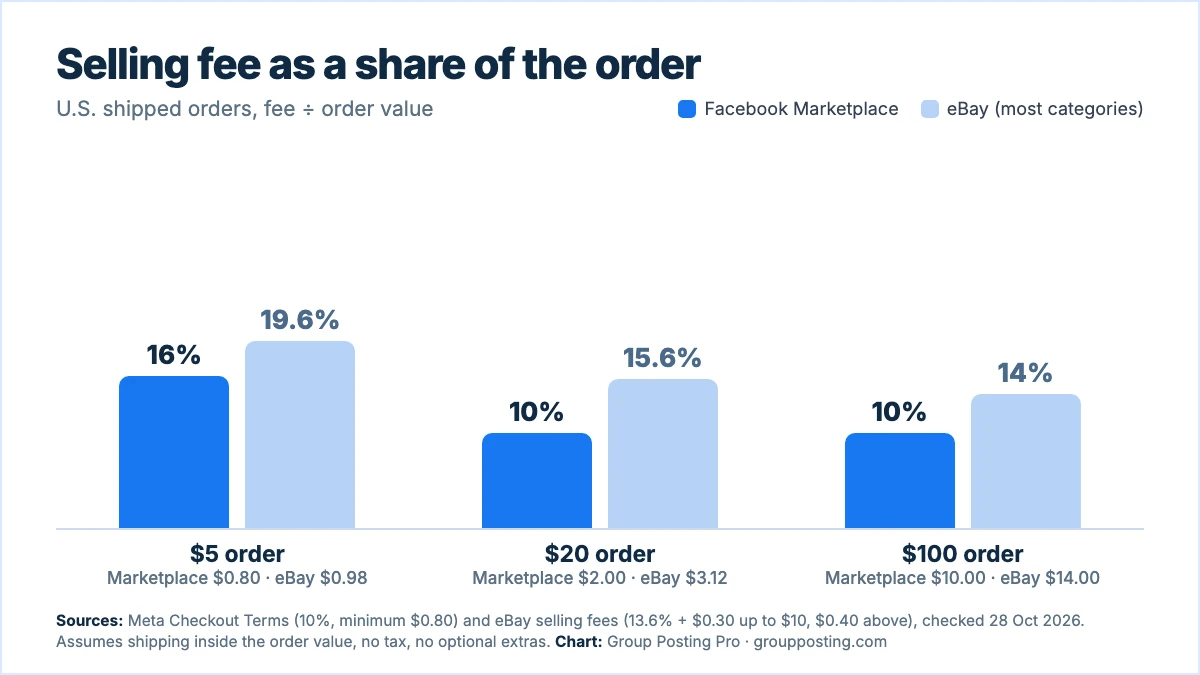
The worked figures are simple. A $100 shipped Marketplace order costs 10% = $10.00 in fees. A $20 order costs 10% = $2.00, above the $0.80 minimum. A $5 order hits the minimum: $0.80, or 16% of the order. On eBay a $100 order costs 13.6% + $0.40 = $14.00, and a $5 order costs $0.68 + $0.30 = $0.98.
The lesson is about small items. The minimum fee makes very cheap shipped items poor value on either platform, so bundle them. Meta’s terms say goods shipped together count as one sale for the fee. Payment providers may charge their own fees on top, and the chart ignores taxes, which are part of the fee base.
3. Who sees your listing
Marketplace is designed for selling to “people in your local community”, according to Meta’s Help Center (Selling on Marketplace). Buyers browse and search listings, so a clear title, photos and price matter more than anything you say about yourself.
A buy and sell group shows your listing to the members. Meta’s help page explains that selling in a group works only if an admin has added the buy and sell feature, and that you can choose, while posting, to add other buy and sell groups you belong to and a Marketplace listing (Meta: sell something in a buy and sell group). Members have chosen to be there, and a neighbour who sees you answer questions quickly may buy from you later.
A niche group is where makers and collectors gather. It is not a shop front. Selling there depends entirely on the rules: some groups allow sale posts, some limit them to one thread, and some ban them. Our guide to Facebook group rules explains how to read them.
Scroll diagram horizontally →
4. The rules that apply
- Commerce Policies cover buy and sell groups. Meta’s help page says groups focused on buying, selling or promoting products are subject to the Commerce Policies, and that you must be an adult to buy, sell or see listings in them (Meta Help Center).
- Some things cannot be sold. Animals, drugs, weapons, counterfeits and items that infringe intellectual property are not allowed in buy and sell groups or on Marketplace (same page).
- Services and downloads are off the table. The Commerce Policies say commerce content may not promote buying, selling or trading of services, except through the WhatsApp Business app or Appointments, and may not promote downloadable digital content or digital subscriptions (Meta Commerce Policies). The policies are about “commerce content”, meaning Meta’s commerce features. A regular group post is also governed by that group’s rules, so check them.
- Group rules sit on top. Admins can ban sale posts, limit them to a day or demand a price in the post. Read them before you post, every time.
- Breaking the rules costs you. The Commerce Policies say listings and content can be removed, and repeated violations can lead to action against the account.
5. Using both without a mess
Meta’s own selling form for a buy and sell group lets you post an item in other buy and sell groups you belong to and add a Marketplace listing in the same step. The catch is on the edit side. Meta says you must edit, delete or mark as sold each post in each buy and sell group separately, and edit the Marketplace listing separately too (Meta Help Center).
Scroll diagram horizontally →
Three habits keep it manageable:
- Keep a one-line log. Item, price, where it is listed, date posted. Update every line the moment something sells, so you never answer “is this still available?” for an item that has gone.
- Change the words per place. A Marketplace title is a search term (“Oak bookcase, 5 shelves”), and a group post is a message to neighbours. Different wording also avoids looking like spam. See how to avoid duplicate post flags.
- Re-check the group rules for each sale. Prices, photos or locations that one group requires may be banned in the next.
6. Which one for which seller
| If you sell… | Start with | Why |
|---|---|---|
| Furniture, bikes, bulky items | Marketplace plus local buy and sell groups | Local pickup, no shipping, and no fee on in-person sales according to a 2024 report. |
| Small, cheap items | A group, bundled | The $0.80 minimum fee makes a single shipped $5 item a 16% fee. |
| Handmade goods or collectibles | Niche groups, where rules allow, plus Marketplace | The audience already cares; Marketplace adds search. |
| A service, lessons or a download | Regular group posts and replies, within each group’s rules | Services and downloads are outside Marketplace and buy and sell groups under the Commerce Policies. |
If you sell services as well as products, read Facebook groups vs paid ads for how organic group posting compares with paying for reach, and free local business advertising for other free channels.
7. Where Group Posting fits
Group Posting is not a Marketplace tool and does not create Marketplace listings or fill in Facebook’s Sell Something form. It is for regular group posts. If you share an announcement, a new collection or a sale reminder in many niche groups, Group Posting lets you write once, choose the groups where the rules allow it and send to one group at a time from your own browser with paced delays between groups. Pro plans add AI variations so each group gets different wording while the offer and link stay the same. Our guide to sharing a post to multiple Facebook groups covers the steps. You stay responsible for each group’s rules and for what you send.
Frequently asked questions
Is it better to sell on Facebook Marketplace or in Facebook groups?
Marketplace is better for one-off physical items that local buyers search for, and groups are better when the audience is a community that already trusts the group. Many sellers use both. Marketplace charges 10% on U.S. orders paid through Meta’s checkout, with a minimum of $0.80.
How much does Facebook Marketplace charge to sell?
Meta’s Checkout Terms list 10% for U.S. Marketplace sales, with a minimum fee of $0.80, calculated on the sale price plus shipping and applicable taxes. That is for sales paid through Meta’s checkout. Check your Seller Hub for your own account.
Can I sell in any Facebook group?
No. In a buy and sell group, an admin must have added the buy and sell feature, and the Commerce Policies apply. In other groups, the admins’ rules decide whether sale posts are allowed.
Can I sell services on Facebook Marketplace?
No. Meta’s Commerce Policies say commerce content may not promote buying or selling services, except through the WhatsApp Business app or Appointments. Digital downloads are also prohibited.
Do I need to edit each listing separately?
Yes. Meta says that you have to edit, delete or mark as sold each post in each buy and sell group separately, and edit the Marketplace listing separately too.
Sources
- Meta: Checkout Terms, fee table, checked 28 October 2026.
- Meta Help Center: sell something in a Facebook buy and sell group, checked 28 October 2026.
- Meta Help Center: selling on Marketplace, checked 28 October 2026.
- Meta: Commerce Policies, checked 28 October 2026.
- eBay: selling fees, checked 28 October 2026.
- Value Added Resource: Facebook Marketplace doubling selling fees, March 2024 (secondary).
Explore the complete guide: Facebook group marketing.
For the group-publishing part of your workflow, explore the group auto-poster and scheduler, or compare plans on Group Posting pricing.