Free Local Business Advertising: Channels and a 30-Day Plan
- Local marketing
- Lead generation
The most useful free local business advertising combines accurate business listings with one reliable way to reach nearby people who need your service. Start with a Google Business Profile if you qualify, check Apple and Bing, then choose relevant community groups, referral partners or directories. You do not need to be everywhere. You need a clear offer, a believable reason to choose you and a contact route you can answer.
This guide is for shops, trades, salons, cleaners and other local operators working without an advertising budget. “Free” means no required media spend for the activity described. Your time, transport, website and any optional software still have costs. We make Group Posting Pro; the workflow section explains where it can help with an established group routine.
The short version
- Capture existing demand: make your eligible listings accurate and easy to contact.
- Earn local attention: answer relevant questions and follow each community's rules.
- Build a repeatable routine: choose one discovery channel and one relationship channel.
- Measure useful outcomes: track qualified enquiries, bookings and time spent.
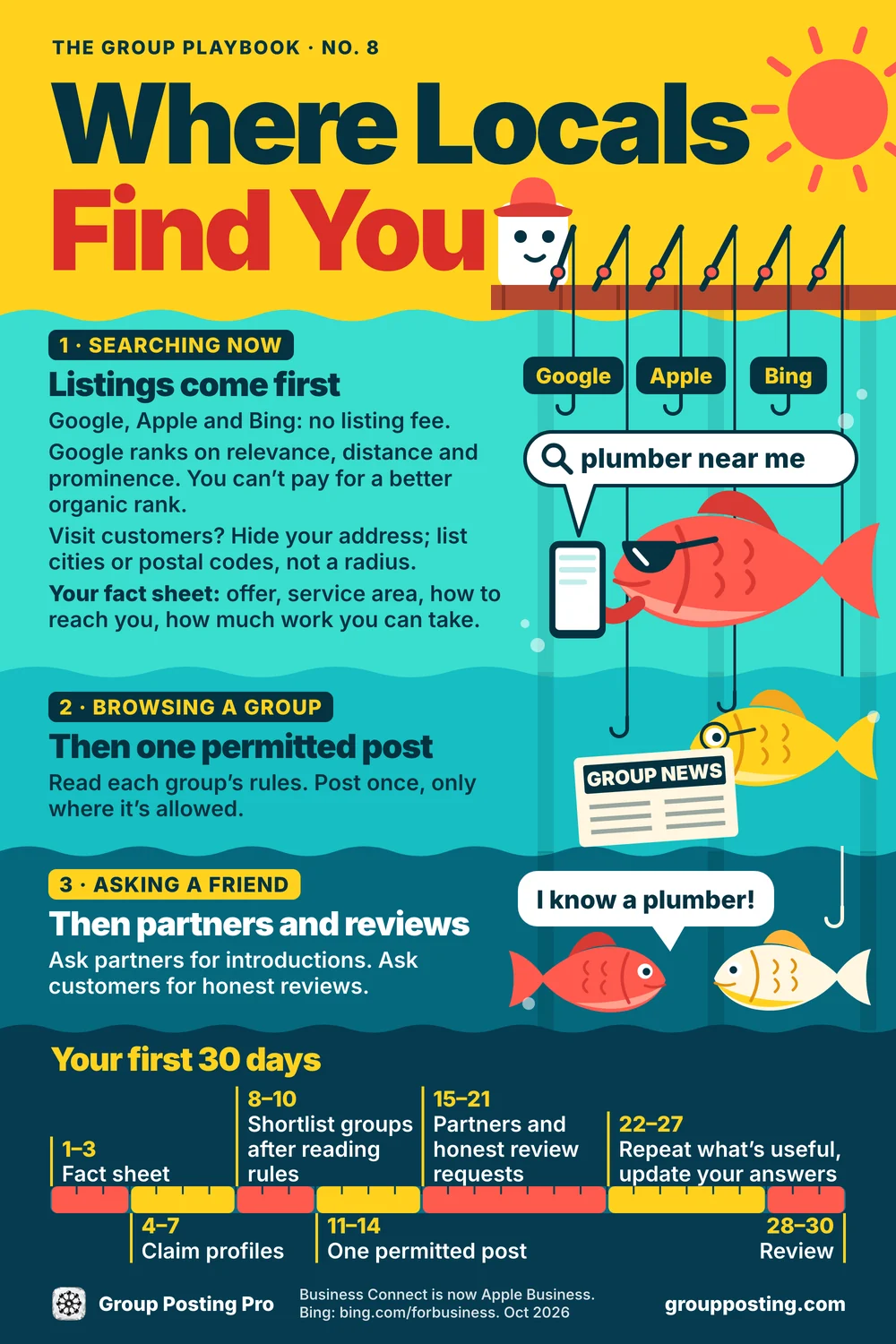
Read this sheet as text
1 · Searching now. Listings come first.
- Google, Apple and Bing: no listing fee.
- Google ranks on relevance, distance and prominence. You can’t pay for a better organic rank.
- Visit customers? Hide your address; list cities or postal codes, not a radius.
- Your fact sheet: offer, service area, how to reach you, how much work you can take.
2 · Browsing a group. Then one permitted post.
- Read each group’s rules. Post once, only where it’s allowed.
3 · Asking a friend. Then partners and reviews.
- Ask partners for introductions. Ask customers for honest reviews.
Your first 30 days
- 1–3: Fact sheet
- 4–7: Claim profiles
- 8–10: Shortlist groups after reading rules
- 11–14: One permitted post
- 15–21: Partners and honest review requests
- 22–27: Repeat what’s useful, update your answers
- 28–30: Review
Business Connect is now Apple Business. Bing: bing.com/forbusiness. Oct 2026
Which free advertising channels should you try first?
Choose by buyer readiness, business eligibility and the time you can maintain. Someone searching for an emergency plumber is making a different decision from someone scrolling a neighbourhood group. A search listing can answer “Who can help now?” A useful community post may answer a question long before a purchase.
Write one offer before opening accounts: “We provide [specific service] for [customer] in [area]; contact us through [route] for [next step].” Replace vague claims such as “all your needs” with something a person can evaluate. A mobile dog groomer might name the suburbs served and explain how to request an appointment. Do not publish availability, insurance or qualifications you cannot substantiate.
Scroll diagram horizontally →
The scorecard below is editorial judgement, not research data. Priority scores run from 1 to 5, with 5 meaning a sensible early test for the stated situation. They do not predict reach, rankings or revenue. The time column describes relative maintenance effort; verification and your starting materials can change it.
| Channel | Buyer readiness | Eligibility or condition | Time cost | Priority |
|---|---|---|---|---|
| Google Business Profile | Often actively searching | Eligible in-person business; verification | Setup, then factual updates | 5 for eligible operators |
| Apple Business | Looking for a place or business | Check location requirements | Setup and periodic checks | 4 for a suitable location |
| Bing Places for Business | Searching for a service | Claim and verify a suitable listing | Setup and periodic checks | 4 after core details are ready |
| Relevant local directories | Varies by directory | Free listing and actual local relevance | Low per useful listing | 3; check audience first |
| Community Facebook groups | High in a request thread; lower in general posts | Membership, promotion rules and approval | Ongoing reading and replies | 3; higher for a clear fit |
| Referrals and partners | Often a specific need | A relevant relationship and permission | Relationship building and follow-up | 5 when relationships exist |
For a new cleaning business, start with eligibility and a clear service area, then customer introductions and selected local groups. Our guide to getting cleaning clients develops that example. A storefront can put more emphasis on opening hours, directions and what customers can find when they arrive.
How do you advertise locally with Google Business Profile?
Google Business Profile is free and helps you manage how your business appears on Google Search and Maps. You do not have to buy ads to maintain it. Google's Business Profile overview confirms the free service. Its representation guidelines require eligible businesses to have in-person contact with customers during their stated hours; online-only businesses are not eligible.
Search for your business before adding anything. Claim the correct existing profile rather than creating a duplicate. Use your real business name, appropriate categories, accurate hours, phone number and a relevant website page. Prepare genuine photos that help a customer recognise your entrance, understand your work or see the service they will receive.
What if you travel to customers?
A service-area business visits or delivers to customers without serving them at its business address. Google instructs those businesses to remove their public address and show service areas instead. Areas are entered as cities, postal codes or other named areas, rather than a radius. See Google's service-area guidance. Use the places you really serve; more place names are not a promise of more visibility.
What actually affects local ranking?
Google describes local ranking in terms of relevance, distance and prominence. Complete information helps Google understand the business, while reviews and other information contribute to prominence. You cannot request or pay for a better organic local ranking, according to Google's local ranking guidance. Treat accurate details and responsive service as work you control; position in results remains outside your control.
Are Apple and Bing business listings still free?
Apple Business: the current name after Business Connect
Apple Business Connect became part of Apple Business on April 14, 2026. Apple announced the new platform as a free service and said existing Business Connect data would migrate. Paid Maps advertising is a separate option. These distinctions come from Apple's platform announcement; an older tutorial using the Connect name may show a different interface.
Check your location rather than assuming Google's service-area settings transfer. Apple's current location setup guide covers adding or claiming a location and verification. Its location attributes guidance describes an address where customers can obtain goods or services during opening hours. Check the requirements before listing a home where you do not receive customers.
Bing Places for Business: a new management address
Microsoft still calls its free listings platform Bing Places for Business. Its official relaunch announcement explains the move from bingplaces.com to bing.com/forbusiness and the option to import Google profile details. Review imported hours, categories and contact information. An import saves entry work; it does not remove your responsibility to check the listing.
Keep a small record of which account controls each profile and when you last checked it. Review special opening hours before holidays and update changed contact details everywhere you maintain a presence.
Which local directories are worth your time?
Prefer a handful that a real customer might use: a relevant trade directory, town business guide, neighbourhood association or specialist directory. A chamber directory may require paid membership, so it does not automatically belong in a free plan. Ask about the basic listing, any renewal charge and whether an upgrade is optional.
For example, Yelp offers a free business page with basic management tools; Yelp's own guide describes photos, review responses and page activity. Use it where the service and local audience fit. Paid placements and extra features should be evaluated separately.
Before submitting, read several listings as a customer. Can you find the right category and area? Do profiles have working contact details? Would you trust the site enough to call someone? Skip directories whose only pitch is a huge number of submissions. A directory entry is a potential discovery route, not evidence that you have gained valuable inbound links.
How can you promote a business in local Facebook groups?
Start by reading, not posting. Search for your town, neighbourhood and the problem you solve. Look at recent conversations: are residents asking for recommendations, organising events or simply posting jokes? A smaller relevant community can be more useful to your offer than a large group with no local fit.
Record each group's rules, allowed promotional day, link policy and whether you can participate as your Page. Meta's group membership guidance confirms that admins may exclude Pages and that participation approval can apply. Membership is not blanket permission to advertise.
Separate a reply to a stated need from a general promotional post. In a recommendation thread, disclose that you own or work for the business. Answer the specific question, state your area and offer one next step. Do not impersonate a customer. For a promotional slot, share practical information and an offer that fits the permitted format.
Illustrative promotional post: “Local business post for the permitted Friday thread: I run a mobile bicycle repair service covering Northfield and West Park. If your bike has been stored over winter, check tyre pressure, brake response and chain condition before riding. I offer home visits for repairs; message our business Page with your area and the problem for a quote.”
The example gives readers something useful even if they do not book. Replace the fictional locations and service with your actual details. Avoid invented urgency, unsupported “best in town” claims and unrelated links.
Illustrative reply to a request: “I own a local repair business and cover your neighbourhood. We can assess the issue you described. If helpful, send the bike model and a photo through our business Page; I can confirm whether it is a job we handle before you book.”
Only use that reply when self-recommendations are allowed. If a group bans promotions, use another channel. Do not send sales messages to everyone who reacts. Read our guide to checking Facebook group rules before building a repeat posting routine. For a service with a visual portfolio, our guide for photographers shows the same approach with post examples and a booking log.
How do referrals and reviews support free advertising?
A referral makes sense when the person being introduced has a relevant need. Ask existing customers whether they know someone who would find your service useful, and let them pass on your details. Do not ask for friends' private contact information so you can pitch them without permission.
Look for complementary businesses: a decorator and a cleaner, a dog trainer and a groomer, or a bicycle shop and an event organiser. Offer a useful introduction or resource before asking for one. Check that you can handle the work you propose, and be clear about any commercial arrangement rather than presenting it as an independent endorsement.
Partner outreach example: “Hello, I run a local cleaning business serving the same area as your decorating team. If customers ask about cleaning after a project, I can provide a short checklist and explain which jobs we handle. Would that be useful? I would be happy to learn which decorating enquiries suit your team too.”
Reviews help a prospective customer evaluate your business, but the rules depend on the platform. Google permits requests for genuine reviews without incentives; it prohibits discounts or gifts for reviews and selectively asking only customers expected to be positive. See its review and content policy. Yelp's review guidance says not to ask customers for Yelp reviews, so do not copy one request across every platform.
Google review request example: “Thank you for choosing us. If you would like to share your experience, you can leave an honest review here: [your Google review link]. We welcome feedback about what went well and what we could improve.”
Use a consistent process for genuine customers, not a filter that routes happy customers to public reviews and everyone else to a private form. Reply professionally without revealing private details of the job.
What should a free advertising link lead to?
A clear service page is often more useful than a busy homepage. Explain what you do, the real areas served, who the service fits, what is included, and how a quote or appointment works. If price depends on the job, say which information you need to estimate it. Give visitors one obvious next step.
Add direct answers to the questions customers ask: “Do you bring supplies?”, “Can I visit without booking?” or “Which suburbs do you cover?” Keep the answers visible as ordinary text, with descriptive headings. Include current business details and genuine work photos where appropriate. This makes the page useful to people and easier to interpret; it does not guarantee a search ranking or a mention in an AI answer.
Test the route yourself on a phone. Does the contact button work? Can a customer submit a request without signing up? Does the confirmation explain what happens next? Do not send free traffic to a form nobody checks.
A 30-day free local business advertising plan
This is an original working calendar, not a forecast. Choose tasks you can maintain alongside customer work. Complete account verification when requested; the calendar does not imply platforms will approve a listing within a particular week.
Scroll diagram horizontally →
| When | Actions | What to keep |
|---|---|---|
| Days 1–3 | Define your offer, service area, contact route and available capacity. | A short business fact sheet |
| Days 4–7 | Claim eligible profiles. Check details, photos and your mobile contact page. | A profile checklist and account owners |
| Days 8–10 | Evaluate local groups and directories. Read rules before joining or submitting. | A shortlist with eligibility notes |
| Days 11–14 | Answer suitable questions and publish one permitted, useful introduction. | Post links and actual enquiries |
| Days 15–21 | Approach relevant partners. Apply your honest review request process. | Agreed introductions and follow-up dates |
| Days 22–27 | Repeat useful activities. Update answers using questions customers asked. | A revised post and service-page answers |
| Days 28–30 | Review enquiries, bookings and effort. Decide what to continue. | One change for the next month |
How do you know which free channel is working?
Keep a simple log: date, channel, activity, time spent, enquiry, qualified lead and booking. Decide what “qualified” means before comparing channels: the person needs a service you offer, is in your area and has a realistic next step. A reaction or page visit is useful context, but it is not a booked job.
Ask enquirers, “How did you first hear about us?” and record their answer. Where links are allowed, use campaign parameters to distinguish a group post from a directory visit. Our UTM guide for tracking social media leads provides a naming system and explains the limits. Someone may notice your post, search your name later and call; a link report alone cannot capture that full path.
Review time as well as leads. A channel producing relevant conversations with manageable effort deserves another test. A busy feed producing only out-of-area messages needs a clearer service area or a different audience. With few enquiries, avoid declaring one channel a winner from a single booking.
How do you keep a local posting routine manageable?
Save approved group rules, draft posts in advance and reserve time to answer comments. Our local business posting workflow shows where Group Posting Pro can support repeated publishing to groups you choose. It posts from your logged-in browser, using Direct API posting through Facebook's internal GraphQL or Classic DOM posting through the interface. When a scheduled run is due, the computer must be awake and online, Chrome open, the extension enabled and Facebook signed in.
Review each audience and draft yourself. Pacing is not a guarantee against restrictions, and software does not grant permission to post. Start with a manageable routine that leaves time for enquiries. The point of free local advertising is to make the right next conversation easier, then deliver the service you promised.
Frequently asked questions
What is the best free advertising for a local business?
Start with a complete Google Business Profile if your business is eligible, then add one channel that puts you in conversations with nearby buyers. That could be a relevant Facebook group, a referral partner or a local directory customers actually use. Choose by customer fit and enquiries rather than audience size.
Is a Google Business Profile really free?
Yes. Google offers Business Profiles at no charge. You can manage your business information without buying Google Ads. Eligibility and verification requirements still apply, and neither a profile nor an advertising purchase guarantees a particular organic local ranking.
Can a home-based business advertise locally without publishing its address?
An eligible service-area business that visits customers can hide its address on Google and list the areas it serves. An online-only business should not assume it qualifies. Check each directory separately because address, verification and location-display rules differ between platforms.
Is Apple Business Connect still the name of Apple's listing service?
Apple Business Connect became part of Apple Business when the new platform launched on April 14, 2026. Existing Business Connect location and account data migrated to the new platform. Apple's free business service and paid advertising options are separate.
Where should I advertise if local groups ban business posts?
Respect the rule and choose another group that explicitly allows promotion, an eligible business listing, a useful local directory or a referral partner. A ban on promotions is not permission to disguise an advertisement as a recommendation or send unsolicited sales messages to members.
Should I offer a discount for a Google review?
No. Google prohibits incentives for reviews, including discounts, gifts and free services. Ask customers for honest feedback without steering their rating, and do not invite only people you expect to be positive. Other review platforms may have different rules about asking for reviews.
How long should I test a free advertising channel?
Use 30 days to establish a routine and review enquiries, qualified leads, bookings and time spent. This is a planning interval, not a promise of results. Listing verification, seasonality, buying cycles and small sample sizes may mean you need more time before drawing conclusions.
Explore the complete guide: Facebook group marketing.
For the group-publishing part of your workflow, explore the Group Posting campaign builder, or compare plans on Group Posting pricing.